Posts

Ubuntu installation on computers with Intel(R) RST enabled. Issues in Ubuntu Dual Boot [Fixed]

Image
 

Install Ubuntu (20.04.1 LTS) with Windows (Dual boot mode)

Image
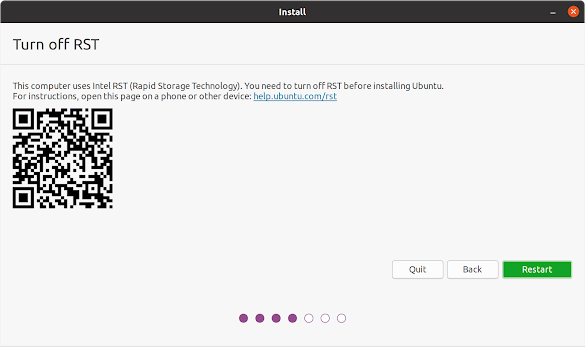
Install Ubuntu (20.04.1 LTS) with Windows (Dual boot mode) Normally Steps Download Ubuntu OS image file  https://ubuntu.com/download/desktop Download Rufus(3.0) ( for create bootable USB drives ) https://rufus.ie/ Install Rufus  Use Default settings  Boot devise Plug the bootable device (Pen Drive or DVD ) Open Rufus Application Select the Boot devise and IOS file. Use Default settings and set Start.  Restart the Machine Press BIOS key (F2) Change the  Secure  Boot Option Disabled Secure boot. Save (F10) and Exit (Esc / Ctrl+Alt+Del). Restart the Machine Press Boot key (F12) Select Bootable Device There can be several bootable options.  Select the Above Boot devise and Press Enter Select the Install Ubuntu Follow the Instruction And Setup the Ubuntu OS. In some Case there can Be Error message as Follows. This computer uses Intel RST (Rapid Storage Technology). You need to turn off RST before installing Ubuntu. For instructions, open this page: help.ubu...
List remote Git branches With the last commit date, commit user, Sort by most recent commit date

Find the last committed Date and Time in the current local branch : $ git log -1 --format=%cd >>>Sun Jun 14 05:03:27 2020 +0530 Find the last committed dates in current checkout local branches : ASC $ for k in `git branch | perl -pe s/^..//`; do echo -e `git show --pretty=format:"%Cgreen%ci %Cblue%cr%Creset" $k -- | head -n 1`\\t$k; done | sort -r >>>2020-06-14 05:03:27 +0530 3 weeks ago branch2 >>>2020-05-03 10:10:41 +0000 9 weeks ago master DESC $ for k in `git branch | sed s/^..//`; do echo -e `git log -1 --pretty=format:"%Cgreen%ci %Cblue%cr%Creset" $k --`\\t"$k";done | sort >>>2020-05-03 10:10:41 +0000 9 weeks ago master >>>2020-06-14 05:03:27 +0530 3 weeks ago branch2 Using git branch -r, you can similarly show remote branches : $ for k in `git branch -r | perl -pe 's/^..(.*?)( ->.*)?$/\1/'`; do echo -e `git show --pretty=format:"%Cgreen%ci %Cblue%cr%Creset" $k -- | head -n 1`\\...

Boot Order Issue Fix

Error :   System BootOrder not found. Initializing defaults. Creating boot entry "Boot001F" with label       "ubuntu" for file "\EFI\ubuntu\shimx64.efi"  Reset System Quick   Fix  : Press "f12" key. select one of the bootOption from available bootOptions. if it not work then try with selecting other bootOptions also. Fixing  :  Press "f2" key. goto "boot option" change the type as "UMFI" And disable "secure boot". move the correct boot select to top of the BootOption list. Now you all set. press "f6" and save chagers and restart. 

How To Commit My Current Changes To A Different Branch In Git

Push commits to another branch It's very simple. Suppose that you have made changes to your Branch A which resides on both place locally and remotely but you want to push these changes to Branch B which doesn't exist anywhere. Step-01: create and switch to the new branch B $ git checkout -b B Step-02: Add changes in the new local branch $ git add . //or specific file(s) Step-03: Commit the changes $ git commit -m "commit_message" Step-04: Push changes to the new branch B. The below command will create a new branch B as well remotely $ git push origin B Now, you can verify from bitbucket that the branch B will have one more commit than branch A. And when you will checkout the branch A these changes won't be there as these have been pushed into the branch B.

What Should You Do If Your Git Branch Has Been Deleted OR Had To Be Deleted.

only we can survive using our local project to solve this question. follow the steps carefully. make a copy of your local project. keep deleted branch repository branch name as current git branch. create a new branch a name that you deleted repository's branch name. open terminal and run git add . git commit -m"message" git pull git push create a new branch that you wanted to move your project. make a merge from A to B ( A - deleted branch name / B - New branch name ) now you can deleted A branch also. thank you.

Google Sheets Supported types

Supported types are: csv  txt  tsv  tab  htm  html  xls  xlsx  xlsm  xlt  xltm  xltx  ods .